An RCS chatbot platform with an AI bot builder. Describe it. The AI builds it. It runs it.
An RCS chatbot is an automated conversation that runs inside the customer’s messaging thread from your verified sender, with cards, buttons and a human handoff. Tell the RCS bot builder what you want in plain English and a working bot appears on the canvas: carousels, menus, data capture, and human handoff, connected and ready. Then the AI becomes its brain, answering customers from your content only. Never off-script.
- No code
- Every change undoable
- Grounded in your content only

It builds your bot, becomes your agent, and runs your conversations.
Most “AI chatbots” mean a bot you still have to build by hand, then a separate AI that answers from a generic model. SimplyRCS is different. The same AI does all three jobs, and it never strays from what you approved.
Builds your bots
Carousels, menus, captures, handoffs, spoken into existence on the canvas. Describe a change and it edits the flow in place. Every change is undoable, so you can experiment without fear.
Becomes your agent
Once built, the AI scopes its own knowledge from the bot you made. You curate what it knows; it never improvises beyond it. The agent is grounded in your content, not the open internet.
Runs your conversations
It gives grounded answers, takes the real actions you built (book, buy, track, redeem), and hands off to a human the moment one is needed, with full chat history so the customer never repeats themselves.
Build a bot in five steps.
Describe it, or start from a template
Type what you want in plain English, or pick a pre-built template: welcome, opt-in, FAQ, lead capture. Duplicate an existing bot to spin up a variation.
Watch the AI assemble the flow
Nodes appear on the canvas and connect automatically: messages, cards, carousels, conditions, actions, data capture, delays, and human handoff. Every step is visible and editable.
Refine on the canvas
Shape every detail in the right rail: card titles, media, branching logic, button labels, captured fields. Reorder with a sentence (“lead with the Red Sneakers”) or drag it yourself.
Test on a real device
Run the bot in a simulator that mirrors RCS rendering on Google Messages, then send a test to your own phone. Tap the buttons, swipe the carousels, confirm the fallback.
Publish to a channel or keyword
One click attaches the bot to your verified sender and/or a keyword. It is live: answering customers, taking actions, and routing to your Inbox when a human is needed.
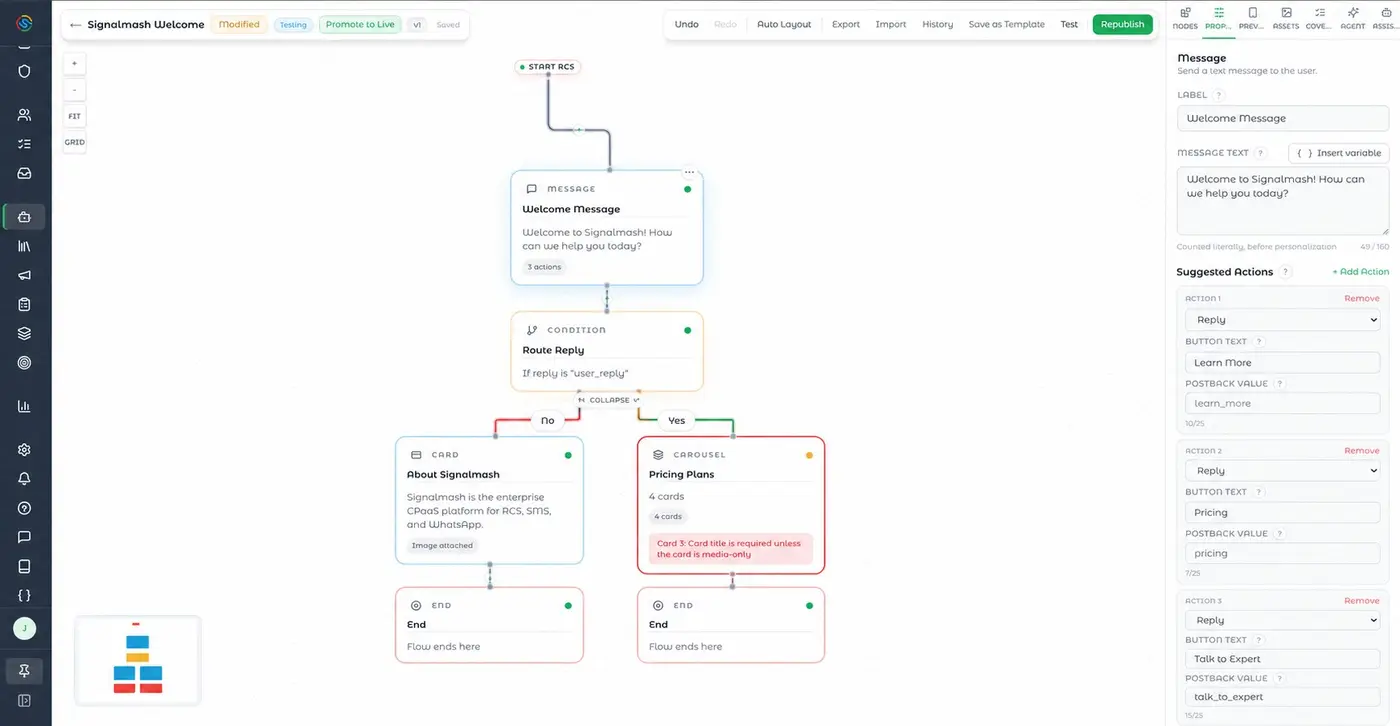
The AI drafts it. You shape every detail.
The AI gets you to a working flow in seconds, but you stay in control of every node. The visual canvas gives you the full node palette and a properties panel for fine-grained edits, so the bot does exactly what your brand needs.
An AI you can actually put in front of customers.
The number-one fear with AI in customer messaging is that it goes off-script: invents a policy, promises a refund you don’t offer, says something that ends up on social media. SimplyRCS makes that structurally impossible.
Answers only from your content
The agent’s knowledge is scoped from the bot you built and the content you approved. It can’t pull from the open internet or make things up. You curate; it stays inside the lines.
Takes only actions you built
It can do what you wired into the flow (book, track, redeem, capture) and nothing else. No surprise actions, no unauthorized commitments.
Compliance sits above the AI
STOP and HELP, opt-out, and consent are handled by the platform above the AI entirely. The AI never gets a chance to mishandle a compliance keyword; those are honored instantly and unconditionally, every time.
Bots for the moments that move your numbers.
Three bots, step by step.
Categories only tell you so much. Here is what a finished bot actually looks like on the canvas, node by node, including where it branches and where it gives up and fetches a human.
Appointment reminder that reschedules itself
Goal: Cut no-shows without the phone tag that usually comes with them.
- Card. A branded card lands 24 hours out: clinic name, logo, appointment time, and the address as a map link.
- List menu. Three options underneath: Confirm, Reschedule, Cancel. The tap is the reply, so nobody types "C" and hopes.
- Condition. Confirm ends the flow. Reschedule branches to the next step. Cancel writes back and releases the slot.
- Data capture. Reschedule shows the next open slots pulled live from the calendar; the patient taps one.
- Action. The booking system is updated by webhook and a fresh confirmation card replaces the old one in the thread.
- Handoff. Anything the flow does not cover, "I need to see a different doctor", routes to the front desk in the Inbox with the whole thread attached.
Cart recovery that shows the actual cart
Goal: Recover checkouts by removing the trip back to the site.
- Delay. Wait an hour after abandonment, long enough that the message reads as helpful rather than surveillance.
- Carousel. The exact items left behind, each as a swipeable card with its real photo, price, and a Buy now button.
- Condition. A returning customer with a saved payment method sees one-tap checkout; a first-timer sees the full cart link.
- Message. No response after a day triggers a single follow-up naming the item, not a generic nudge. One follow-up, not four.
- Action. Purchase fires a webhook that exits the flow immediately, so nobody gets chased for something they already bought.
Support triage where the AI answers, then stops
Goal: Deflect the repeat questions and escalate everything else cleanly.
- Message. The customer opens with whatever they want, in their own words. No menu tree to navigate first.
- AI agent. The agent answers from your approved help content only: shipping windows, return policy, store hours. If the answer is not in what you approved, it does not improvise.
- Condition. A question about a specific order branches to lookup rather than being answered from general content.
- Data capture. It asks for the order number, then reads the real status back as a card.
- Handoff. Anything about a refund, a complaint, or a question outside its knowledge goes to a human with the full transcript, so the customer never repeats themselves.
No-code for teams. Full API for developers.
Marketing builds and ships without engineering. But when developers want control, the same bots are available programmatically: design in the canvas and export the flow, or build headless via the REST API and MCP server. Action nodes call your webhooks; events stream back in real time.
The bots teams build most.
A representative ranking of the highest-volume automations by messages sent. Switch the range to compare how the mix shifts over time.
Most active automations
- 1Welcome & Onboarding48,210
- 2Abandoned Cart Recovery39,884
- 3Appointment Reminders31,552
- 4Order & Delivery Updates27,140
- 5Loyalty Rewards18,963
- 6Support Deflection12,447
RCS bot builder questions.
What are some examples of RCS chatbots?
Common RCS chatbots include an appointment reminder that lets the customer confirm, reschedule against live calendar slots, or cancel with one tap; a cart-recovery bot that shows the abandoned items as a swipeable carousel with a Buy now button; and a support-triage bot where an AI agent answers from your approved help content, looks up a real order status, and hands off to a human for refunds or anything outside its knowledge. Each is built from the same nodes: cards, carousels, list menus, conditions, data capture, actions, and handoff.
What is an RCS bot builder?
An RCS bot builder is a tool for creating interactive Rich Communication Services chatbots: automated flows with carousels, menus, buttons, and two-way conversation that run inside the phone’s default messaging app. SimplyRCS’s builder is AI-native: you describe the bot in plain English and the AI assembles it on a visual canvas, then runs the conversation grounded in your content.
Can AI build a messaging bot for me?
Yes. With SimplyRCS, you describe what you want, for example, “show three products, let people browse or talk to a person, and capture emails,” and the AI builds the working flow on a canvas you can edit. The same AI then answers customers, using only the knowledge and actions you approved.
Do I need to code to build an RCS chatbot?
No. The SimplyRCS bot builder is fully no-code: describe a flow or start from a template, then refine it visually. Developers can optionally export the flow or build via the REST API and MCP server, but it isn’t required.
Is it safe to let AI answer customers?
Yes, by design. The SimplyRCS agent answers only from content you approved and takes only actions you built into the flow; it can’t pull from the open internet or invent offers. Compliance keywords like STOP and HELP are handled above the AI entirely, so they’re always honored.
What can an RCS bot do?
An RCS bot can show product carousels, present tappable menus, capture data like emails, branch on customer attributes, take actions such as booking or tracking an order, and hand off to a human agent, all inside a verified, branded conversation in the native messaging app.
How do I test an RCS bot before going live?
SimplyRCS includes a simulator that mirrors RCS rendering on Google Messages, plus the ability to send a test message to your own phone. You can tap buttons, swipe carousels, and verify the SMS/MMS fallback before publishing.
How does the bot hand off to a human?
A handoff node routes the conversation to your Inbox, where an agent takes over with the full chat history visible, so the customer never has to repeat themselves. You can hand back to the bot at any time.
Speak your first bot into existence.
Book a demo and we’ll build a working RCS bot for your business, live, from a sentence, on a real phone. Or start free with a sender ID test.